
SmartRent
SmartRentHouse & Home
4.52.89K Reviews
- Version
- 4.10.4
- Installs
- 500.00K
- Age Rating
- Everyone
Screenshots
Our Review of SmartRent
 Analysis by Appyee
SmartRent is the kind of home app I would judge by one practical question: does it make daily access and apartment routines simpler than the usual keys, remotes, separate building tools, and repeated calls to a property office? My experience is that it can, but only when your home or community is already set up to work with it. That dependency matters more than its polished presentation.
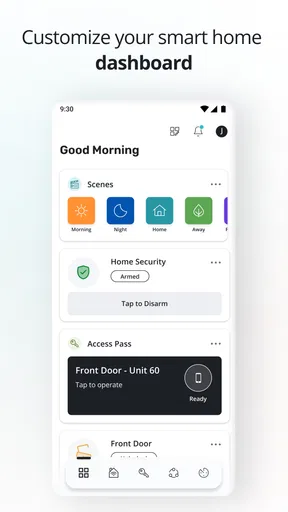
Developed by SmartRent, this free House & Home app is aimed at residents who want to manage supported smart-home and access functions from a phone. It is available for Everyone, and its long presence on mobile makes it feel like an established part of a connected rental experience rather than a novelty. I would not describe it as a universal smart-home controller, though. Its usefulness is closely tied to the services enabled for your particular property.
How I Decide Whether SmartRent Is Worth Using
The first decision criterion is not the app itself but your living arrangement. If your landlord, building manager, or community uses SmartRent equipment and has invited you into the system, the app may become a convenient daily control point. If no compatible setup exists where you live, installing it alone is unlikely to transform your home. That is the first distinction between this app and a general-purpose home automation platform.
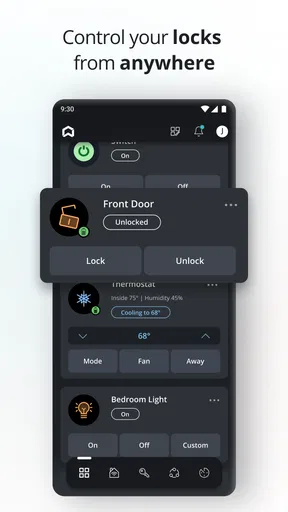
I also look at how often an app removes friction. Opening a door from a phone sounds minor until you are carrying groceries, arriving with luggage, or trying to let someone in while you are not standing beside the entrance. In those moments, a well-integrated access app can replace a physical key and reduce the need to coordinate through a leasing office. The benefit is less about showing off smart technology and more about reducing small interruptions.
My second criterion is clarity. A home-control app should make it obvious which door, device, or home function I am dealing with before I tap anything. Confusing labels are more serious here than in a casual app because an accidental action can affect access or comfort. I would spend time learning the layout during a quiet moment instead of trying to discover it for the first time outside the building.
The third criterion is reliability in ordinary conditions. I would want my phone charged, my account ready, and a backup plan available before treating the app as my only way into a home. Digital convenience should not encourage me to forget every physical alternative. A phone can be misplaced, unavailable, or affected by connectivity problems, and that reality is especially important when access is involved.
SmartRent has earned a 4.5 average from around 23 thousand ratings, with roughly 2.8 thousand written reviews. Those figures suggest that many users find the experience worthwhile, but they should not be read as a promise that every resident will receive the same feature set. A property’s installation, account setup, and management practices can shape the experience as much as the software.
The everyday situations where it feels most useful
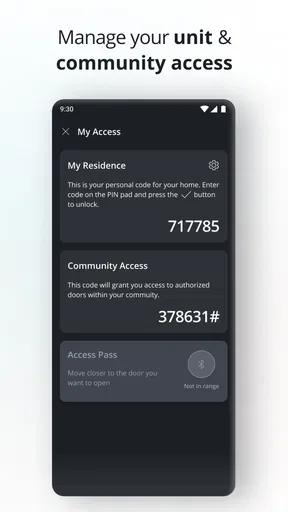
The strongest use case for me is the busy arrival. Imagine coming home with shopping bags while your phone is already in your hand. Instead of putting everything down to search for keys, I can use the access controls available in my community and continue inside. That is a small improvement, but repeated small improvements are exactly where a home app earns its place.
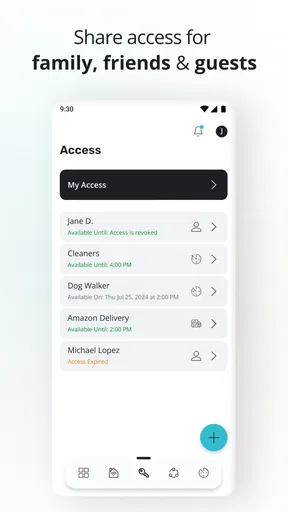
Another useful situation is planned access for a visitor or service appointment. The important advantage is not simply opening a door remotely; it is being able to handle an arrival without physically walking to an entrance every time. I would still use judgment about who receives access and when. Convenience does not remove the need to review permissions carefully or to close access arrangements when they are no longer needed.
For residents who move between several parts of a managed property, having related controls in one mobile experience can be easier than remembering which key, fob, or building procedure applies to each location. That consolidation is a genuine strength. It is particularly helpful for people who dislike carrying extra objects or who regularly forget where they placed them.
The app can also be useful for someone who is comfortable with phone-based routines but does not want to build a complicated smart-home system from separate brands. A managed setup is usually less experimental than assembling devices independently. The trade-off is that the resident has less control over what is installed and how deeply the system can be customized.
Where SmartRent wins over familiar alternatives
Compared with ordinary keys, the main advantage is flexibility. A key is simple and dependable, but it cannot normally help when I am away from the door or when I need to coordinate access without handing over a physical copy. SmartRent can make those situations more manageable when the relevant controls are enabled.
Compared with a property website or a phone call to management, a dedicated app may shorten the path between a resident and an everyday home action. I do not have to explain the situation to another person each time I need to use an available control. That can be especially valuable outside office hours, although I would not assume that every building service belongs inside the app.
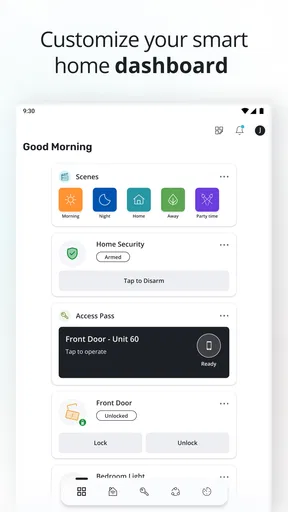
Compared with a collection of separate manufacturer apps, the appeal is concentration. Residents generally do not want to remember one application for an entry point, another for a home device, and a third for community-related tasks. When SmartRent brings supported parts of the living experience together, it feels more coherent than a scattered arrangement.
There is also a psychological advantage. I find it easier to trust a system when I understand where its controls live and what each one does. A single resident-facing app can provide that sense of order. The benefit is strongest for people who prefer guided simplicity over technical experimentation.
Important trade-offs before making it your default key
The biggest limitation is dependence on the property. SmartRent cannot compensate for a building that has not enabled the functions you want, an invitation that has not been processed, or a setup that differs from what you expected. Before relying on it, I would confirm with management which doors and home features are actually connected to my account. That conversation can prevent a disappointing first day.
Account access is another practical concern. If you change phones, lose access to your email, or encounter a sign-in problem, the app may become less convenient precisely when you need it. I recommend keeping recovery details current and learning the building’s normal backup procedure. This is not an argument against digital access; it is a reminder not to confuse convenience with independence from all other methods.
Phone-based entry also requires a change in habit. With a key, I know immediately whether I have it in my pocket. With an app, I need to think about battery level, the correct account, and the phone’s general readiness. That extra mental step is small for some people and annoying for others. If you prefer a completely passive routine, a physical key or fob may feel better.
I would also avoid assuming that every smart-home function is equally valuable. Access is usually easier to appreciate than a long list of controls that I rarely use. A resident should judge the app by the actions that matter in their own routine, not by the idea of a connected home. If the only useful feature is a door control, that can still be enough, but it should shape the decision.
How it compares with different kinds of alternatives
The usual alternatives fall into three groups: physical access tools, property-managed web or office processes, and broader smart-home platforms. SmartRent sits between them. It is more flexible than a key, more immediate than waiting for assistance in some situations, and generally more focused on a managed residence than a do-it-yourself automation system.
A physical key remains the better choice for someone who values simplicity above remote convenience. It needs no account interface and does not ask the resident to learn an app. Someone who rarely uses connected features, dislikes phone-based access, or wants a straightforward backup should keep that option available even when SmartRent is installed.
A general smart-home platform may be a better fit for a homeowner who wants to combine equipment from different brands and design detailed personal routines. SmartRent makes more sense when the property has already selected and installed the supported system. I would not choose it expecting the same freedom as a fully self-directed setup.
Building-specific communication channels can remain important as well. An app may simplify supported resident actions, but it does not automatically replace maintenance requests, policy questions, or every conversation with management. I see SmartRent as a practical layer for connected home access, not as a complete substitute for the property’s entire resident relationship.
Small workflow tips that make the experience better
I would begin by exploring the app while standing safely inside, not during a rushed arrival. Learn the names of the available controls, check which areas are represented, and make sure the account reflects the correct residence. This simple preparation reduces hesitation later and helps reveal whether the setup matches what you were told.
For shared homes, agree on a routine before everyone starts using the app independently. Decide who should manage invitations, how temporary access is handled, and what happens when a roommate moves out. The useful insight here is that digital access can multiply quickly: removing a physical key is obvious, while removing an old digital permission may be forgotten.
I would also treat the phone as part of the access system. Keep it reasonably charged before leaving, avoid signing out casually, and know where the physical or management-provided backup is. This is a better workflow than discovering the limits of mobile access at the entrance after a long day.
Finally, use the app as a focused tool rather than constantly checking it. The value comes from shortening specific tasks, not from turning every home routine into a screen interaction. If a physical action is already faster and more dependable for you, there is no need to force the digital route simply because it is available.
Who should use it and who should skip it
I would recommend SmartRent to residents in participating communities who regularly deal with access, visitors, or supported connected-home controls. It is especially appealing if you already carry your phone everywhere and want fewer physical items in your pocket. The free price also makes trying the resident experience straightforward when your property supports it.
I would be more cautious for people who want a universal controller for any smart device they own. That expectation can lead to frustration because this is tied to a managed residential environment rather than being a blank canvas for unlimited equipment. A broader platform may suit a technically minded homeowner better.
I would also hesitate to make it the sole option for an older resident or anyone uncomfortable with account-based technology unless a trusted person can help with setup and recovery. The app may be easy once configured, but the surrounding steps—invitation, sign-in, phone readiness, and backup planning—still matter. Familiar physical access may be less stressful for some households.
For a family with children, I would consider whether giving everyone digital access is actually helpful. It can reduce key-sharing problems, but it also creates more accounts and more opportunities for forgotten permissions. I would start with the smallest sensible group and expand only when the routine proves manageable.
Version, availability, and the cost of switching
The current version is 4.10.0, and the app runs on Android 8.0 or later. That makes compatibility worth checking before I plan a move away from existing keys or building procedures. A resident with an older phone should verify the device before assuming the app will be usable on it.
SmartRent has been available since September 7, 2017, and has passed half a million installs. That history and adoption give me more confidence than a brand-new access app would, but they do not remove the need to test the specific property setup. The meaningful question is whether my account and doors work as expected, not just how long the app has existed.
The cost of switching is not mainly financial because the app is free. The real cost is behavioral. I may need to learn a new routine, update household expectations, and keep a backup method while I gain confidence. If my property already uses the system, that transition is relatively small. If I am trying to persuade a building to adopt it, the decision belongs largely to management and involves equipment and operational choices beyond my phone.
I would avoid discarding physical keys immediately. Use the app alongside the established method until several normal entries and visitor situations have gone smoothly. That approach lets me discover practical friction without turning one technical problem into a locked-door emergency.
My recommendation after weighing the alternatives
SmartRent is best understood as a property-connected convenience, not a universal smart-home solution. In the right apartment community, it can make access less awkward, reduce dependence on copied keys, and put supported controls in a place I already carry. Those are meaningful benefits, especially for busy residents and households that often coordinate entry.
My recommendation is positive if your community actively supports it and you are willing to maintain a sensible backup routine. I would install it, complete the account setup carefully, test the controls indoors, and confirm exactly what it handles before relying on it. The 4.5 average and broad user base are encouraging signs, but the quality of your own experience will still depend on the property’s implementation.
I would skip it as a primary solution if you are looking for open-ended device compatibility, dislike account-based access, or have no participating setup around you. In those cases, a physical key, a simpler building process, or a broader smart-home platform may be a better match. For everyone else, SmartRent earns its place when it removes a real daily inconvenience rather than merely adding another icon to the phone.
Privacy and Permissions
See what permissions an app requests and how it handles your data.
- Contacts
- read your contacts
- Location
- approximate location (network-based), precise location (GPS and network-based)
- Photos/Media/Files
- read the contents of your USB storage, modify or delete the contents of your USB storage
- Storage
- read the contents of your USB storage, modify or delete the contents of your USB storage
- Camera
- take pictures and videos
- Microphone
- record audio
- Wi-Fi connection information
- view Wi-Fi connections
- Other
- view network connections, pair with Bluetooth devices, access Bluetooth settings, full network access, change your audio settings, control Near Field Communication, run at startup, control vibration, prevent device from sleeping
Verdict
Strengths of SmartRent
- Remote control of compatible smart home devices from one app.
- Maintenance requests can be submitted directly to property management.
- Digital keys may simplify access to homes and shared amenities.
- Useful notifications for deliveries, visitors, and community updates.
- Helps residents monitor certain home features while away.
Limitations of SmartRent
- Features depend heavily on property management and installed SmartRent hardware.
- Some devices may require additional subscriptions or compatible accessories.
- App performance can vary after updates or on older smartphones.
- Smart home controls may stop working during internet or system outages.
- Availability and functionality differ significantly between communities.
Similar Picks in This Category
View All
Universal TV Remote Control
CodeMatics Media Solutions3.9

AlfredCamera Home Security app
Alfred Systems Inc.4.7

Planner 5D: AI Home Design
Planner 5D4.5

Universal Tv Remote-Cast to TV
One Music Player4.1

Zillow: Homes for Sale & Rent
Zillow Group4.8

99acres Buy/Rent/Sell Property
infoedge.com4.3
Frequently Asked Questions
What is SmartRent, and what can I use it for?
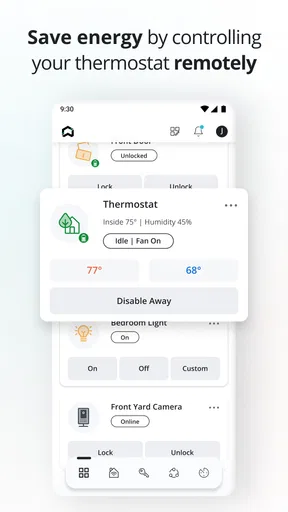
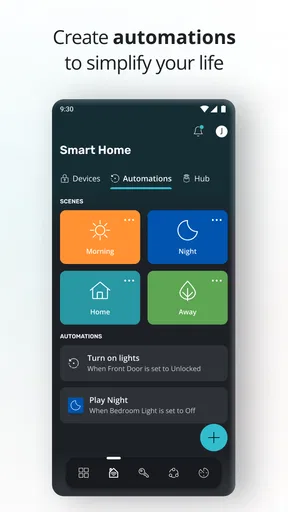
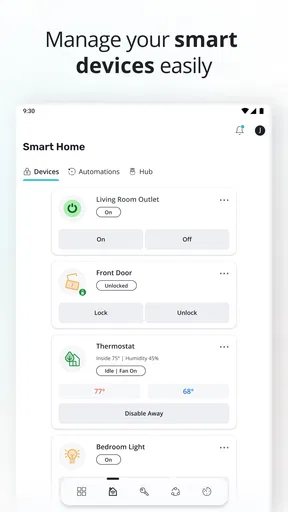
SmartRent is a resident-focused smart home and rental management app designed for properties that support the SmartRent platform. Depending on your community and installed devices, you may be able to unlock doors, control thermostats, manage lights, view access activity, submit maintenance requests, receive property messages, and manage other apartment features from your Android or iOS device. Available tools can vary by property.
Does SmartRent work with every apartment or rental property?
No. SmartRent generally works only when your apartment community, landlord, or property manager has installed and enabled compatible SmartRent hardware and services. Before downloading, confirm that your property participates in the SmartRent program and that your unit has been registered. Some features may also require specific locks, thermostats, sensors, or other supported devices.
How do I sign in and connect my apartment to SmartRent?
After installing SmartRent, residents typically sign in using an invitation or account details provided by their property management team. You may need to verify your email address or phone number, accept permissions, and follow instructions to connect your unit. If your apartment does not appear, a device is missing, or setup fails, contact your property manager because they usually control resident access and device enrollment.
Is SmartRent safe to use for unlocking doors and controlling devices?
SmartRent includes account authentication and property-managed access controls, but users should still protect their login information and phone. Avoid sharing passwords, keep the app and operating system updated, and use a secure screen lock or biometric protection. Smart home security also depends on the property’s hardware, network, installation, and policies, so report suspicious activity or lost devices to management promptly.
Does SmartRent require an internet connection, Bluetooth, or location access?
SmartRent’s requirements depend on the feature and the equipment installed in your property. Remote controls and account services normally need an internet connection, while nearby device interactions may use Bluetooth or other phone permissions. The app may request notifications, location, or local-network access for certain functions. Some controls may be unavailable during outages, weak connectivity, or device maintenance.
